How Sam built an AI highlight reel builder with Remotion and Codex that turns interview recordings into short videos, plus what AI tools cost a whole team.

Yes, people with no video editing skills can now make polished video reels, because the editing can be written as code. On Episode 36 of Built This Week, Sam Nadler demos a highlight reel builder he made so recruiters can cut AI interview recordings into short branded reels on their own, and Jordan Metzner explains why Remotion, the library Sam built it on, makes video editing as code so useful. Sam built most of it in OpenAI Codex.
The raw material is the video from Ntrvsta, the AI interview tool that runs technical and non-technical interviews with candidates. Sam's tool, which he calls a highlight reel builder, takes one of those recordings and packages it into a short branded reel. The recruiter drops in the video, types the candidate's name and title, and pastes in the transcript from the Ntrvsta interview.
The transcript is what makes it work. Sam says the AI analyzes it and finds the candidate's best responses, returning nine clips in three groups: English communication, role fit, and personality and drive. Each clip shows as a waveform the recruiter can listen to and trim so it doesn't end mid-word. Sam's rule of thumb is about three clips of roughly fifteen seconds each, keeping the reel under one minute. The one in the demo ran forty-three seconds.
From there the recruiter picks an aspect ratio, previews the graphics and audio to check the flow, and moves on to render settings. You can see more of how it works on the candidate highlight reel builder page, and the story of the interview tool itself in Episode 6.

Watch Jordan and Sam on Remotion in Episode 36 (starts at 9:00) · Episode 36 notes and transcript
Sam says rendering was the hardest part of the build. Getting the video to render in a reasonable amount of time took the most work, and it still takes five to ten minutes. Before the tool, the same reel meant briefing one of the team's video editors, giving them all the context and waiting for them to fit it into their workflow.
So five to ten minutes versus several hours, if not days, feels like a reasonable compromise.
— Sam Nadler, Episode 36
The finished reel comes back as an S3 link that can be shared directly. In the demo, a senior data analyst explains how she handles the whole process from data extraction and ETL to modeling and visualization. Sam says the tool was mainly built in Codex on top of Remotion.
Jordan points out that video editing used to happen offline in heavy desktop apps like Premiere, Final Cut or iMovie, and then moved to mobile apps like CapCut. Remotion is different.
This is all video editing as code, which makes it so much more interesting, especially the possibilities of creating infinite amounts of video slates.
— Jordan Metzner, Episode 36
Jordan thinks of Remotion as a JavaScript video library. Before AI, he says, writing out everything you want a video to be in JavaScript would have been cumbersome. He first saw it in the early vibe coding days, when someone was using it as a video editing tool. Beyond rendering, it has a player and its own editor you can build on, with dynamic features in React that you can put into your own app. He says it is still early for video creation via code, and as Remotion and your prompts get better, the videos will get significantly better.
Sam says Jordan told him about the tool, and he started by plugging it into Claude Code before moving to Codex. He had zero editing skills. He just described in natural language how he wanted the colors and graphics to look, and the AI built the template from his feedback.
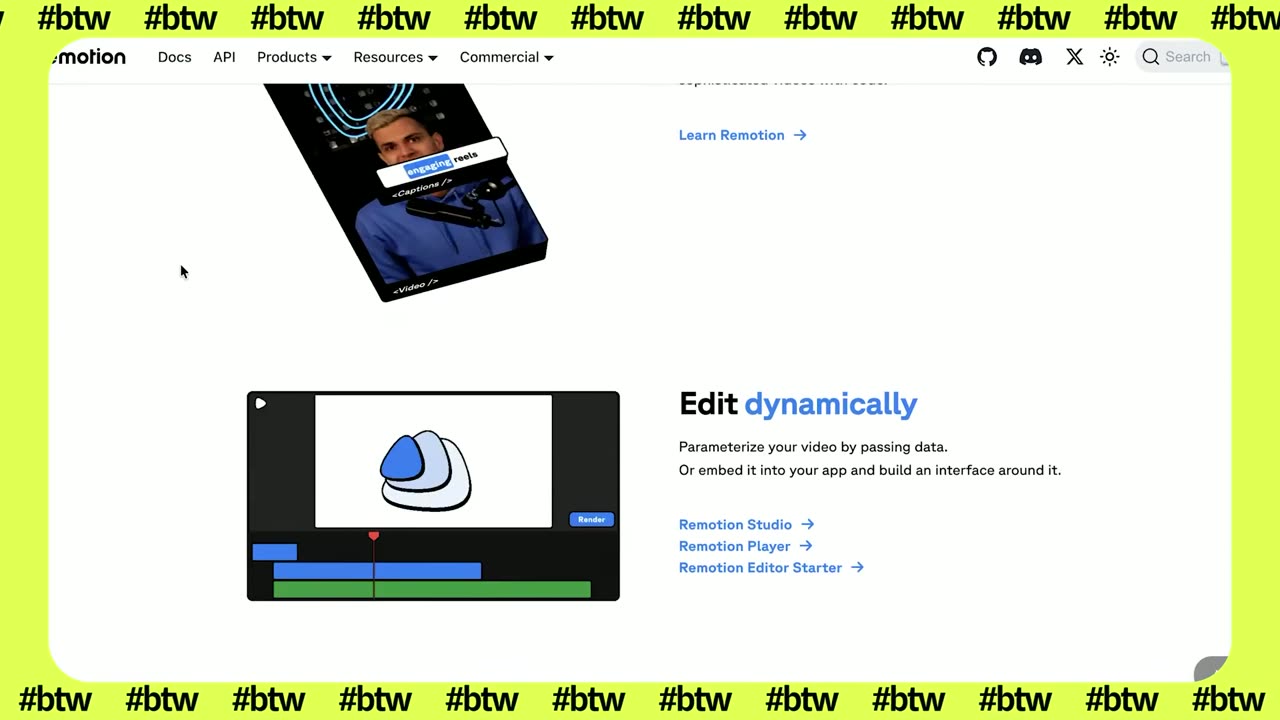
Jordan uses Remotion in a few other ways. When he builds a new product feature, he makes a Remotion trailer for it. He grabs a track from a royalty-free music library, uses the waveform of the music so the visuals hit on the beat, and says the trailers have been pretty effective.
He also took a 65-page slide deck and turned it into a narrated video using Remotion and ElevenLabs for the text to speech. And he has seen people use Remotion for automated documentation, where the video of a new build goes straight into the docs. His plan is to keep using it, because it is fun and it makes really nice animated videos.

In the news segment, Sam explained that the company is on a big push to get everyone up to speed on AI, technical or not, with people in non-technical roles running AI side projects. That made one headline stand out: "You finally figured out AI at work. Now here comes the bill."
Jordan says everyone now has access to Claude Code and Claude Cowork, some people use Codex, and the team has had ChatGPT and Gemini for a while. Not all models cost the same. Right now the guidance is to use whatever model you want, but he expects that optimizing which model you use for which output will matter once spend grows. In the end, he thinks companies will compare token input and output with each worker's output and arrive at something like an efficiency score: is this person getting good value from these tools, or wasting money?
Sam thinks AI use will be managed on two sides: whether people are adopting it and moving faster, and how much they spend doing it. The team hasn't started limiting tools or models by role yet. Jordan has heard of large organizations giving people a fixed token budget, and sees open source models on servers you already own, plus models getting cheaper every release, as ways to keep costs down.
Sam raised an argument he isn't sure he agrees with: that heavy AI use could cost as much in tokens as the labor it replaces, which would slow the disruption of the job market. Jordan hadn't heard it put that way. He says everyone is becoming more agentic, and running agents is not free. He knows of a friend who bought a Mac Mini and then a Mac Ultra just to run more agents, and expects that demand to spike and then come back down.
So, if everyone's spending money on all these tokens, what are you getting for that?
— Jordan Metzner, Episode 36
Is the roadmap moving faster? Are you making or saving more money? Jordan's view is that it is still too early to see how it shakes out.

Sam walks through the highlight reel builder screen by screen, and Jordan shows the Remotion player and editor, in Episode 36 of Built This Week. The full transcript is on the episode page.